Insights
Custom Flight Case RFQ Checklist: 12 Details Buyers Should Provide
A 12-point checklist for preparing the equipment, transport, handling and documentation details needed for a custom flight case quotation.
A custom flight case quotation is only as accurate as the information provided with the request.
A short message such as “We need a case for our equipment” does not define the case structure, internal layout or handling configuration. Missing information usually leads to additional questions, revised drawings and quotations that are difficult to compare.
Before requesting a quotation, buyers should prepare a practical RFQ package covering the equipment, transport conditions and operating requirements.
The checklist below explains what to send and why each item matters.
Quick Answer
For a useful custom flight case quotation, buyers should send 12 details: the equipment or application, complete dimensions, total packed weight, quantity, destination, transport and handling method, photos or drawings, accessory list, opening and removal direction, fragile or restricted areas, external size constraints, and identification or documentation requirements. Clear inputs allow the supplier to review the same project scope before discussing a case configuration.
For context on the available supply routes, start with the Product Overview.
RFQ Checklist Summary
The 12 points below form the minimum structured brief for a custom flight case RFQ.
| No. | Information to provide | Why it matters |
|---|---|---|
| 1 | Equipment or application | Establishes what the case must protect and how it will be used |
| 2 | Complete dimensions | Defines the equipment envelope and any internal or external limits |
| 3 | Total packed weight | Informs structure, support, lifting and mobility decisions |
| 4 | Quantity | Separates prototypes, repeat units and different configurations |
| 5 | Destination | Clarifies the likely route and logistics constraints |
| 6 | Transport and handling | Describes the actual movement, loading and storage environment |
| 7 | Photos or drawings | Shows geometry, interfaces and fragile details that dimensions may miss |
| 8 | Accessories | Prevents omitted items from changing the layout later |
| 9 | Opening and removal direction | Defines access, lid style and operator handling needs |
| 10 | Fragile or restricted areas | Identifies surfaces that must not carry pressure |
| 11 | External constraints | Captures doorway, vehicle, rack, pallet or freight limits |
| 12 | Identification and documentation | Defines labels, drawings, records or project-specific requirements |
Table of Contents
Use the links below to move directly to each RFQ input.
- Identify the equipment or application
- Provide complete equipment dimensions
- State the equipment weight
- Confirm the required quantity
- Include the destination
- Describe the transport and handling method
- Send clear photos or drawings
- List every accessory
- Explain the opening and removal direction
- Identify fragile and restricted areas
- Define any external constraints
- Specify identification and documentation needs
- Copy the practical RFQ template
1. Identify the Equipment or Application
Start by explaining what the case will protect.
Include:
- Equipment name or general application
- Equipment model or internal reference number
- Whether the case is for one item or a complete equipment set
- Whether the equipment will be removed before use or operated inside the case
- Any confidential information that should be excluded from drawings or labels
The application helps the case designer understand how the equipment is handled. A case used for warehouse storage may require a different configuration from one that is repeatedly loaded, transported and opened in the field.
Buyers should provide a clear description such as “inspection instrument,” “mobile control unit” or “laboratory equipment” while excluding commercially sensitive details that are not required for the project. The final information requirement should be confirmed against the equipment and the agreed project scope.
2. Provide Complete Equipment Dimensions
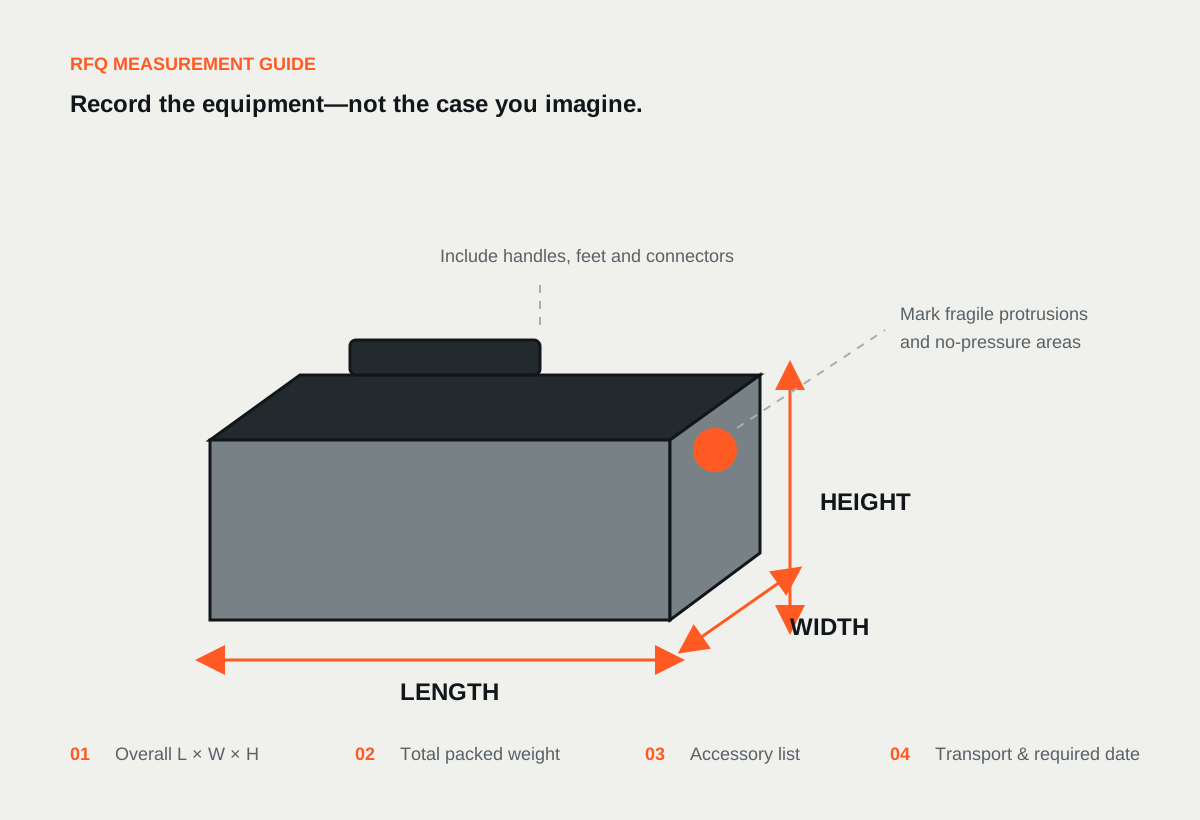
Provide the equipment dimensions in a clearly defined order, such as:
Length × Width × Height
Always include the unit of measurement.
The measurements should include anything that projects beyond the main equipment body, including:
- Handles
- Connectors
- Feet
- Controls
- Screens
- Brackets
- Hinges
- Cables that remain attached during transport
Also state what the dimensions represent:
- Equipment outside dimensions
- Required usable internal dimensions
- Maximum allowable external case dimensions
These measurements are not interchangeable.
Equipment dimensions help establish the fit. Internal dimensions are important when CNC Foam Inserts must fit an existing case, drawer or enclosure. External limits matter when the finished case must pass through a doorway, fit into a vehicle, occupy a defined storage area or stay within a freight restriction.
For irregular equipment, provide dimensions at several points instead of using only the largest overall measurement.
3. State the Equipment Weight
Provide the weight of the equipment and everything that will travel inside the case.
This may include:
- Main equipment
- Cables and accessories
- Batteries
- Tools
- Spare components
- Documents
- Removable trays or internal fixtures
Weight affects more than the choice of handles or casters. It also influences the case structure, reinforcement, lifting method, internal support and the way dense equipment is positioned.
If the equipment has an unusual centre of gravity, identify the heavy side or mark the lifting points on a drawing.
Do not estimate the weight from equipment dimensions alone. Two products with similar dimensions may require very different handling configurations.
4. Confirm the Required Quantity
State how many identical cases or CNC Foam Inserts are required.
If the project includes several equipment configurations, separate them clearly. For example:
- Configuration A: one main unit and two accessories
- Configuration B: one main unit and four accessories
- Configuration C: replacement CNC Foam Inserts only
Quantity affects production planning and determines whether all units can follow one approved drawing or whether several layouts are needed.
Also indicate whether the request is for:
- An initial quotation
- A prototype or fit-check unit
- A small batch
- A repeat order
- An estimated annual requirement
This information should describe the project stage without assuming any pricing or order condition.
5. Include the Destination
Provide the destination country and, where possible, the destination city or port.
The destination helps clarify:
- Expected transport route
- Likely freight method
- Export packing requirements
- Storage and handling conditions
- Whether external size or weight restrictions may apply
If the freight arrangement has not been decided, say so. The destination should still be included as part of the RFQ context.
If the project has a required dispatch or arrival date, include it as a planning input. It should not be treated as a confirmed production or delivery commitment until it appears in an approved quotation.
6. Describe the Transport and Handling Method
Explain how the case will actually move through the supply chain.
Useful details include:
- Air, sea, road, courier or mixed transport
- Transport frequency
- Manual lifting, trolley movement, forklift handling or pallet loading
- Indoor or outdoor use
- Warehouse stacking
- Vehicle loading and unloading
- Floor conditions at the destination
- Whether the case must move through stairs, lifts or narrow access points
Avoid using broad descriptions such as “heavy duty” without explaining the expected handling environment.
A case that is occasionally moved between two indoor locations has different requirements from one that is repeatedly transferred between vehicles, warehouses and field sites.
If a particular test method, material requirement or acceptance criterion applies, include the exact requirement in the RFQ. It should be reviewed as a project-specific condition rather than assumed from the term “flight case.”
The Engineering Support page explains how project information moves from requirement capture to an approved configuration.
7. Send Clear Photos or Drawings
Send clear photos or drawings because dimensions alone may not show the equipment geometry, interfaces or fragile details.
Useful images include:
- Front, rear, top and side views
- Handles and lifting points
- Connectors and fragile controls
- Protruding components
- Underside and mounting feet
- Equipment shown with all transport accessories
- Existing damage-sensitive surfaces
- Current packaging, if relevant
Place a ruler or another known scale beside irregular components where helpful.
For more complex equipment, provide available 2D drawings, 3D data or marked sketches. Photos should be accompanied by complete and accurate dimensions. The final case or CNC Foam Inserts configuration must be based on confirmed project information and the approved drawing or requirements.
Make sure the drawing revision matches the equipment that will actually be packed.
8. List Every Accessory
List every accessory that must travel in the case before the first layout is prepared.
Create a complete packing list covering items such as:
- Power cables
- Signal cables
- Chargers
- Batteries
- Tools
- Sensors
- Mounting brackets
- Remote controls
- Spare parts
- Manuals and documents
- Consumables
State the quantity and dimensions of each item.
Also explain whether accessories need:
- Individual foam cavities
- A shared compartment
- A removable tray
- A drawer
- A document pocket
- Labels or part numbers
- Separation from the main equipment
Do not assume that unused space can be converted into accessory storage later. Adding accessories may affect the case dimensions, internal support and overall weight.
9. Explain the Opening and Removal Direction
The case should be designed around how the equipment is accessed.
Tell the supplier:
- Which side should open
- Whether the lid should be hinged or removable
- Whether the equipment is lifted vertically or removed from the front
- Whether the equipment stays inside the case during use
- Which accessories must be reached first
- Whether cables must remain connected
- Whether one person or several people will remove the equipment
- Which surfaces can safely be gripped
For CNC Foam Inserts, identify where finger access is required. Operators should be able to remove the equipment by its housing or intended lifting point rather than pulling on a connector, screen or other sensitive component.
A photo or sketch showing the preferred removal direction is often more useful than a long written description.
10. Identify Fragile and Restricted Areas
Mark any part of the equipment that should not carry pressure.
Examples include:
- Screens
- Lenses
- Connectors
- Control knobs
- Calibrated surfaces
- Shafts
- Antennas
- Delicate finishes
- Ventilation openings
Also identify the areas that can safely support the equipment.
This information helps determine where the internal structure should locate, support and separate the equipment. It is especially important when several items share one case.
If the equipment surface has special contact, cleaning, chemical, temperature, flame or electrostatic requirements, state the required material specification and supporting documentation. Do not rely on a general foam name alone.
11. Define Any External Constraints
Define every external constraint because a case can fit the equipment but still fail the surrounding logistics.
Tell the supplier about any restrictions involving:
- Doorways
- Lifts
- Vehicle compartments
- Storage racks
- Workbenches
- Aircraft or freight limits
- Pallet footprints
- Maximum lifting weight
- Required stacking orientation
State whether the limit applies to the empty case, loaded case or shipping package.
If no external size limit exists, say that the case can be configured around the equipment and handling requirements.
12. Specify Identification and Documentation Needs
Specify all identification and documentation needs in the RFQ so they can be reviewed as part of the project scope.
Possible requirements include:
- Shipping marks
- Case numbers
- Equipment position labels
- Part numbers
- Handling labels
- Buyer-supplied artwork
- Engraved plates
- Drawing revision references
Also list any documentation that must accompany the quotation or order, such as:
- Configuration drawing
- Material description
- Packing list
- Inspection photos
- Test or inspection records against a specified requirement
Availability and scope should be confirmed for the individual project.
A Practical RFQ Template
Buyers can copy the following structure into an email or enquiry form:
Equipment or application:
[Describe the equipment and how it is used.]
Equipment dimensions:
[L × W × H, including units and protruding components.]
Equipment weight:
[Main unit plus all items packed inside.]
Quantity:
[Number of identical cases or configurations.]
Destination:
[Country and city or port.]
Required date:
[Required dispatch or arrival date; subject to quotation confirmation.]
Transport method:
[Air, sea, road, courier or mixed transport.]
Handling method:
[Manual lifting, casters, pallet, forklift or other method.]
Equipment access:
[Top opening, front access, removable lid, operated in case or removed before use.]
Accessories:
[List each item, quantity and dimensions.]
Fragile or restricted areas:
[Identify surfaces that must not carry pressure.]
External size restrictions:
[Doorway, vehicle, storage, rack or freight limit.]
Photos or drawings:
[Attach current photos, drawings and revision information.]
Special requirements:
[State the exact material, test, marking or documentation requirement.]
Why a Complete RFQ Matters
A complete RFQ gives the supplier a reliable starting point without requiring the buyer to make every design decision in advance.
Its purpose is to establish a reliable starting point. When the equipment, accessories and handling environment are clearly described, the supplier can review the case structure, opening method, internal layout and mobility requirements against the same project information.
It also makes quotations easier to compare. A low quotation and a high quotation may not describe the same construction, hardware, internal layout or documentation scope.
The comparison should begin with the written specification, not the price alone.
Buyers looking for a finished protective case can review Custom Flight Cases, while projects involving an existing enclosure can begin with CNC Foam Inserts.
When the RFQ package is ready, Send your requirements for a configuration review.
Suggested FAQ
These questions address the most common points buyers need to clarify before submitting an RFQ; additional project questions are covered on the Frequently Asked Questions page.
What are the minimum details needed to request a custom flight case quotation?
Provide the equipment dimensions, weight, quantity, destination, transport and handling method, photos or drawings, accessory list, and required opening or removal direction.
Should dimensions include handles and connectors?
Yes. Include all protruding components that remain attached during transport. Clearly state whether the measurements are equipment dimensions, required internal dimensions or maximum external case dimensions.
What should accompany equipment photos?
Provide complete and accurate equipment dimensions, weight, accessory information and relevant restrictions with the photos. The final configuration must follow the confirmed drawing or agreed project requirements.
Why does the supplier need the equipment weight?
Weight influences the structure, reinforcement, handles, mobility arrangement, internal support and lifting method. Include accessories and other items packed in the same case.
What should I provide for accessories?
List every accessory, its quantity and dimensions, and explain whether it needs an individual cavity, shared compartment, tray, drawer or label.
Why is the removal direction important?
The removal direction affects the lid or opening configuration, foam reliefs, support positions and operator access. It also helps prevent users from lifting equipment by a sensitive component.
Should special testing or documentation requirements be included in the RFQ?
Yes. State the exact standard, test method, acceptance criteria and documentation required. These requirements should be reviewed and quoted for the individual project.